Answer every customer in seconds, not hours
Dunefox combines omnichannel customer support, shared inbox software, and an AI helpdesk across website chat, WhatsApp, Instagram, Messenger, and Telegram. It answers from your own content and passes anything unusual to your team with the full conversation attached.
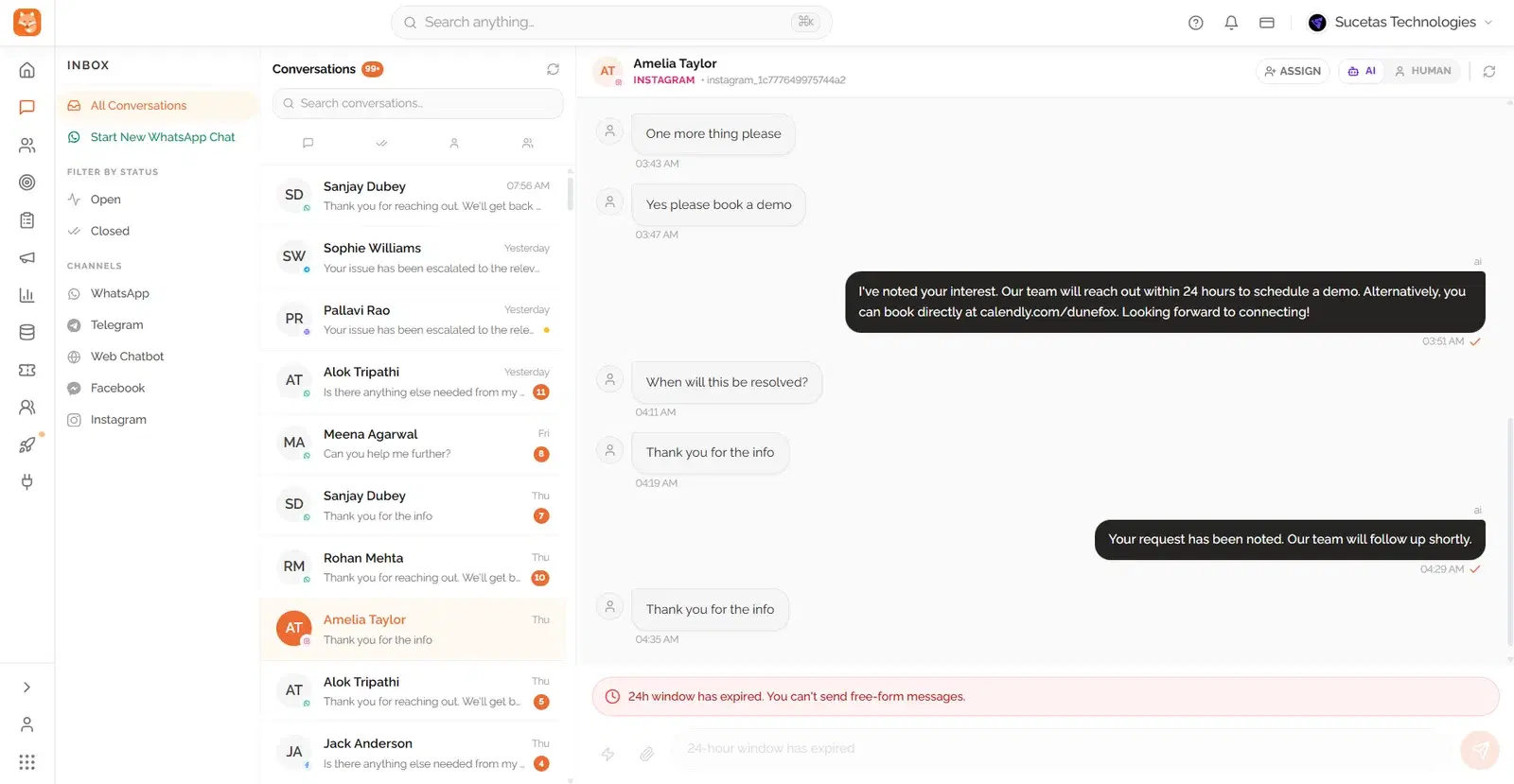
None of this is about your team working harder. It is what happens once messages arrive faster than a small team can read them, on more channels than one person can watch.
The same twenty questions, all day, every day
Opening hours, pricing, delivery times, refunds, where an order is. Your team retypes the answers instead of doing the work only a person can do. Customer support automation clears these instantly so the queue is only the real problems.
Messages scattered across five different apps
Website chat in one tab, WhatsApp on somebody's phone, Instagram on another login. Things get missed because nobody can see everything at once. Shared inbox software puts every channel in one place with one history per customer.
Customers waiting overnight for a simple reply
A question at nine in the evening waits until the morning, and by then the buyer has asked somebody else. An AI support agent covers the hours you are not at your desk without hiring a night shift.
Who this is actually built for
Not every support tool fits every team. This is who Dunefox tends to fit well.
Support leads at growing teams
Ticket volume has outgrown what two or three agents can read in real time, but hiring a night shift or a second regional team is not yet the right call.
Founders still answering support themselves
You are the one replying to WhatsApp and website chat between everything else. An AI agent trained on your own content takes the routine half of that off your evening.
Ecommerce and service teams juggling channels
Instagram DMs, WhatsApp, a website widget and email each need a different login today. One inbox, one customer history, regardless of where the message came from.


Live in about ten minutes
Connect your content
Paste your website address. Dunefox reads your pages and help articles and builds the knowledge base for you. Add files or write answers by hand at any point, and the AI support agent only ever answers from what it finds there.
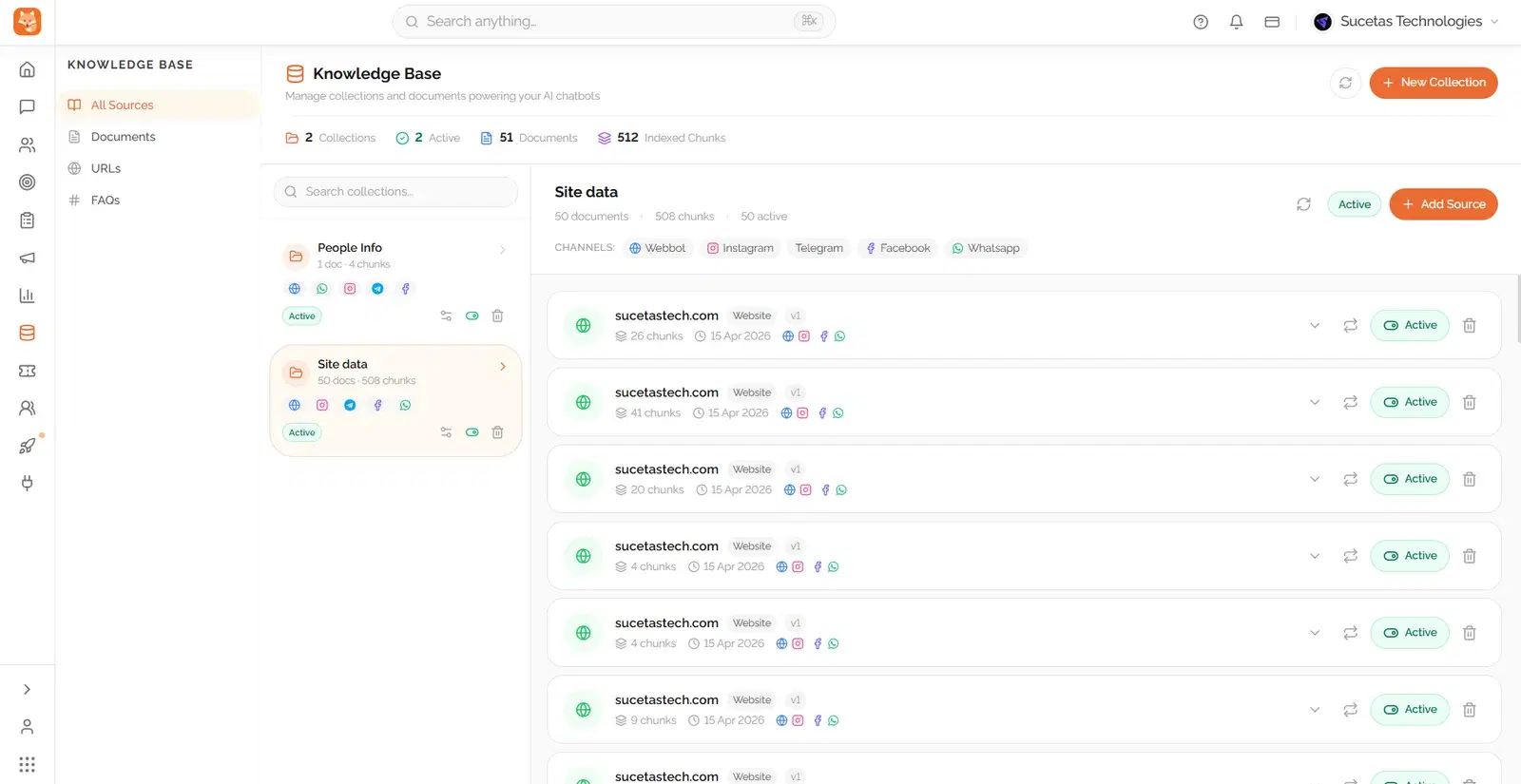
Turn on your channels
Drop the chat widget on your site and connect WhatsApp, Instagram, Messenger or Telegram. Each one starts feeding the same shared inbox straight away, so switching channels never means switching tools.
Set the handover rules
Decide what the AI answers on its own and what goes to a person, by topic, by team or by how confident the answer is. When it hands over, the full transcript goes with it, so nobody has to ask the customer to explain again.
A support desk that already knows your business
You point Dunefox at your website and your help documents. It reads them, and from that point it answers in your words rather than generic phrasing.
Answers grounded in your own content
The AI replies from your website, policies and help articles. When it does not have the answer, it says so and hands the conversation over instead of guessing.
One inbox for every channel
Web chat, WhatsApp, Instagram, Facebook Messenger and Telegram all land in the same shared inbox. Your team replies from one screen and the customer history follows the person, not the app.
Handover with the whole story attached
When a conversation needs a human, it is assigned with the full transcript, the customer details and what has already been tried.
Tickets, ratings and reporting built in
Turn a conversation into a ticket, track it to closed, and ask for a satisfaction rating at the end. See response times, resolution rates and what people ask most often.
Multilingual by default
The AI detects and replies in 50+ languages automatically, including code-switching mid-sentence, without a separate setup per language.
Role-based access for the whole team
Give agents, team leads and admins different permissions, so a new hire can answer conversations on day one without touching settings they shouldn't.
Support doesn't stop at chat, answer the phone too
Dunefox Voice extends the Dunefox suite to calls that never reach a chat window. Its AI receptionist answers from an approved knowledge base, qualifies callers, and can hand the call to a person when needed.
See the AI receptionist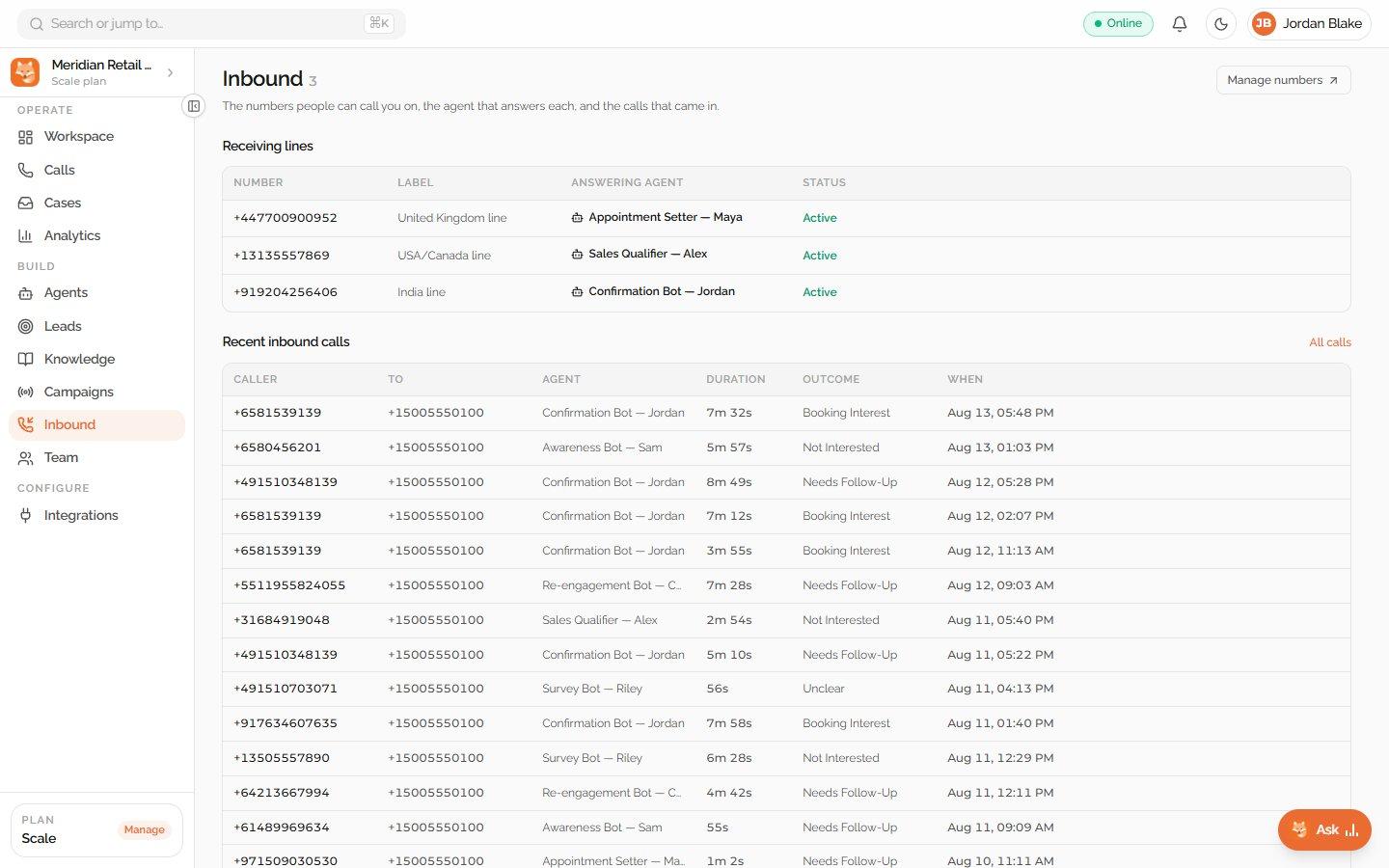
What a shift actually looks like
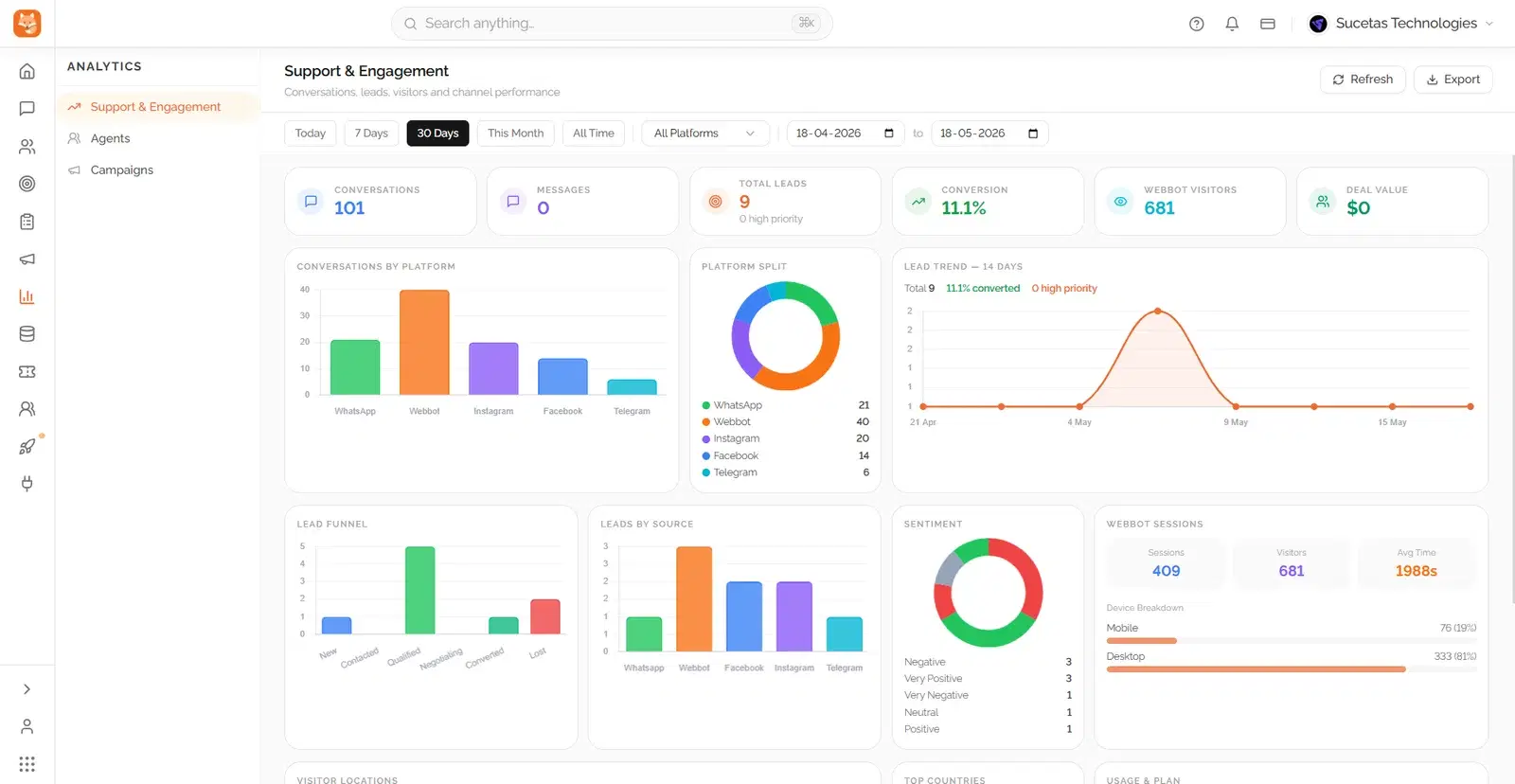
Support analytics, not a spreadsheet export three days later. Here is what a team lead sees while the day is still happening.
- 1
Response and resolution time, live
First response time, resolution rate and open ticket count update as conversations happen, not as an end-of-week report.
- 2
What people are actually asking
The most common topics surface automatically, useful for spotting a product issue or a confusing policy page before it becomes a pattern of complaints.
- 3
Where the AI is handing over, and why
See which topics get escalated most, so you know what to add to the knowledge base next, rather than guessing at gaps.
90%
of routine queries handled by AI
3x
faster first response
50+
languages, detected automatically
24/7
cover, including out of hours
Where teams put this to work
Support looks different depending on what you sell. These pages show the same product set up for a specific kind of business.
Frequently asked questions about Dunefox
How does Dunefox automate customer support?
Dunefox deploys an AI support agent trained on your knowledge base, including product FAQs, refund policies, service descriptions, PDFs, and website URLs. The AI answers inbound queries across WhatsApp, Instagram, Facebook, Telegram, and website chat 24/7. It detects customer intent and sentiment, resolves up to 90% of routine queries, and logs every AI-to-human handoff with the available context.
What triggers escalation from AI to a human agent in Dunefox?
Escalation is triggered by three mechanisms: keyword triggers (e.g., "refund", "urgent", "manager"), AI sentiment detection (negative or frustrated tone), and intent recognition (complex requests the AI cannot resolve). When escalated, a support case is automatically created, assigned to the right agent, and flagged with the escalation reason, ensuring the agent picks up with full context.
Does Dunefox support multiple languages for customer support?
Yes. Dunefox AI responds in 50+ languages out of the box. The AI auto-detects the customer's language and replies accordingly, with no manual configuration required per customer. This is particularly useful for businesses serving customers across India, the UAE, Southeast Asia, and the UK from a single workspace.
How does Dunefox track customer satisfaction (CSAT)?
After every support case is closed, Dunefox automatically sends a CSAT rating request to the customer, which includes a 1 to 5 star rating with optional written feedback. All ratings are aggregated in the Analytics dashboard showing average CSAT score over time, number of rated cases, and trends by channel or agent.
Can Dunefox handle file sharing in customer support conversations?
Yes. Both customers and agents can send and receive images, videos, PDFs, audio files, and documents directly within the Dunefox inbox across all supported channels. Website visitors can also upload files through the embeddable chat widget.
How does ticketing work in Dunefox?
Every time a conversation is escalated to a human agent, Dunefox automatically creates a support case with a unique case ID (e.g., #AB1234C). Cases track open and closed status, time to resolution, escalation reason, agent assignment, and customer satisfaction rating. Agents can filter and search cases by status, channel, date, or case ID. Role-based access means agents only see cases assigned to them; managers see all.
Let your team stop retyping the same answers
Start the 14 day free trial. No card, no call, and you can see it answering your own customers today.
14 days free. All Fox Pro features. No card required.