Send the message on the app your customers actually open
Run WhatsApp broadcast campaigns with a sales chatbot and lead generation chatbot that handle every reply. Offers, restocks, reminders and announcements use the official WhatsApp Business API. This is WhatsApp marketing automation with reply handling built in.
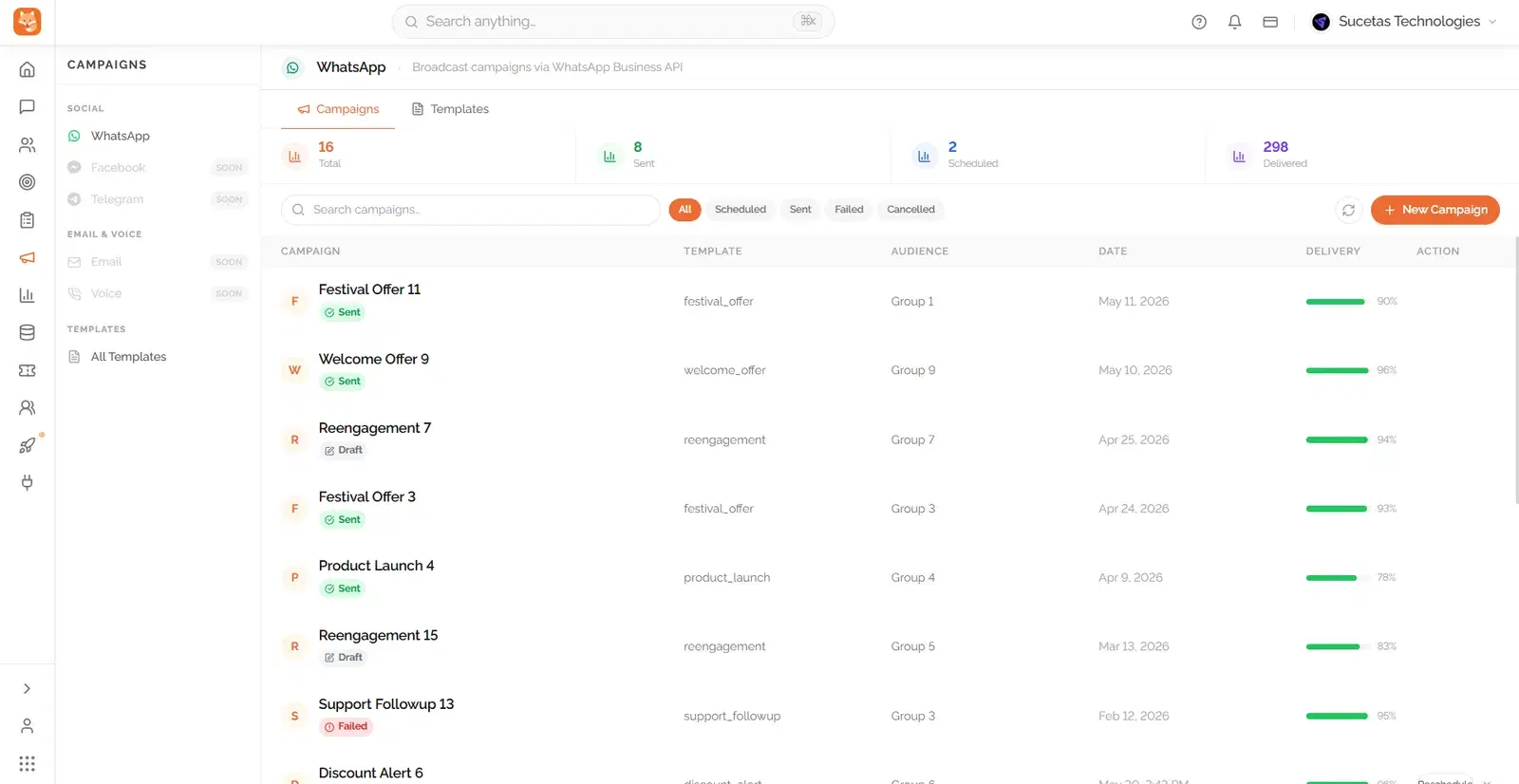
The message is usually fine. What breaks is where it lands, whether it reaches the right slice of your list, and what happens after somebody replies.
Email goes to a tab nobody visits
You write the offer, you send it, and it sits under forty other newsletters. A WhatsApp broadcast message puts the same message somewhere people already look several times an hour.
Everyone gets the same message
Past buyers, cold sign ups and people who asked about one specific product all receive the identical broadcast. Customer segmentation means each group hears something that actually applies to them.
Replies arrive and nobody is watching
A campaign that works creates a wave of questions. If those go unanswered for a day, the campaign has cost you goodwill rather than earned sales. Here, an AI sales agent answers as they land.
Who this is actually built for
Broadcasting to a list is easy, handling what comes back is the part most tools leave you to figure out.
Ecommerce and retail brands
Restocks, new arrivals and seasonal offers sent to a segmented list, with every question that comes back answered by the same AI that runs your storefront chat.
Service businesses filling their calendar
A reminder or a seasonal offer sent to past clients, with booking questions handled immediately instead of waiting for someone to call back.
Teams tired of low email engagement
Open rates on email have been flat for a while and the list is the same one you already have, WhatsApp puts the message somewhere it actually gets read.

From list to conversation
Pick who it goes to
Build a segment from your existing contacts by what they bought, asked about, or how engaged they are, or upload a list. You are choosing a group, not blasting everybody you have ever spoken to.
Write it once, get it approved
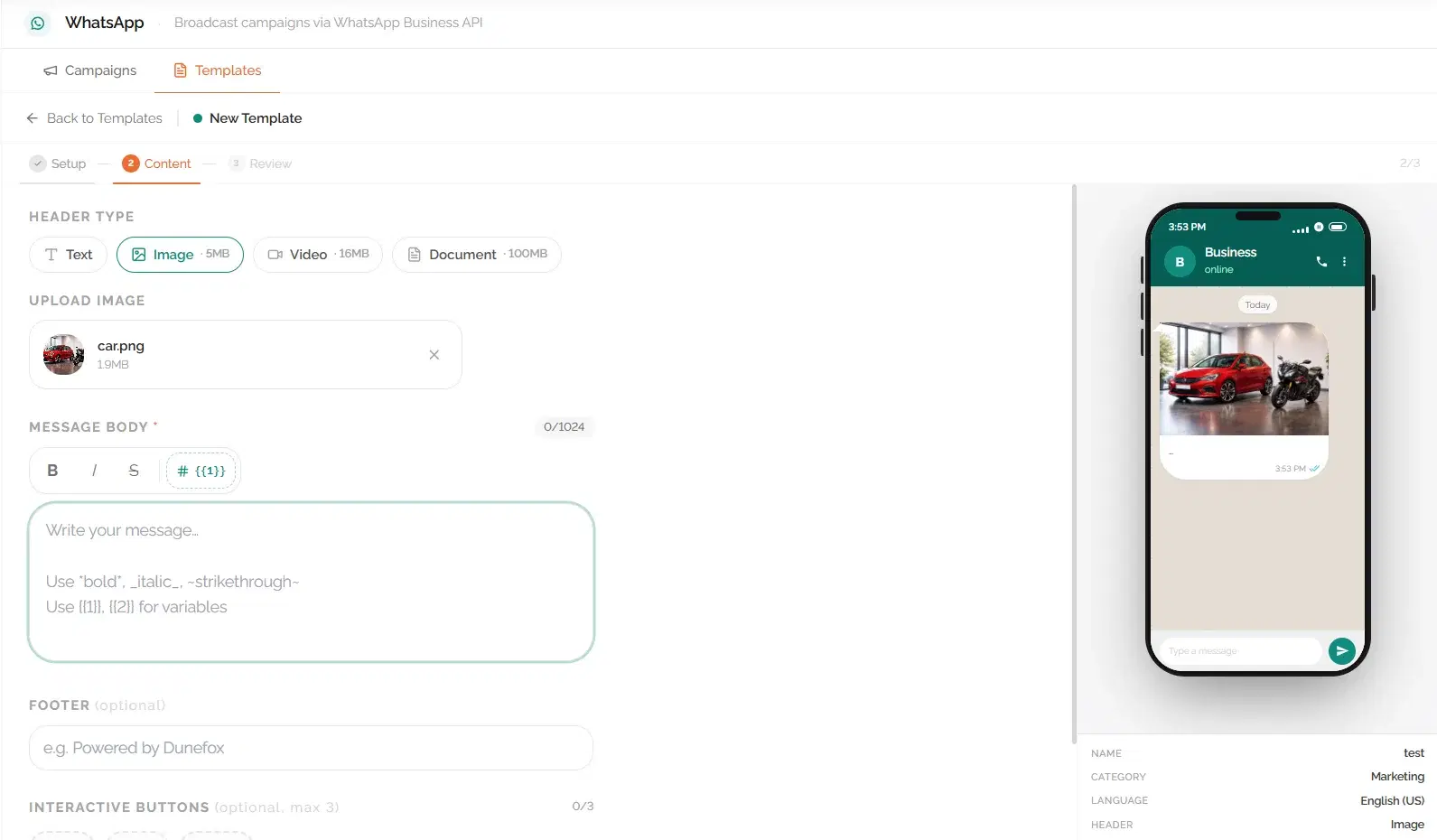
Use the template builder to compose the message, add buttons and variables, and submit it for WhatsApp approval from inside Dunefox. Reuse the ones that perform instead of rewriting each time.
Let the AI take the replies
Questions get answered in the customer's own language, around the clock. Anyone showing real intent is scored and passed to your sales team instead of sitting in an unread inbox.
Campaigns, replies and results in one place
Most tools send the message and stop. The point of running it inside Dunefox is that the conversation afterwards is handled too.
WhatsApp broadcasts on the official API
Send to your customer list through the WhatsApp Business API with approved message templates, so your number stays in good standing rather than getting blocked.
Segments built from real behaviour
Group people by what they bought, what they asked about, where they came from or how engaged they are, then send to just that group.
A template builder without the guesswork
Compose the message, add buttons and variables, and submit it for approval from inside Dunefox.
Delivery, replies and revenue tracked
See what was delivered, read and replied to, and follow which conversations turned into sales. Every reply becomes a scored lead rather than a dead end.
Conversational commerce, not a one-way blast
A customer can ask a question mid-campaign and get answered immediately, in their own language, without leaving the chat.
One record across marketing and support
A reply to a campaign and a support question later that week land in the same customer history, so nobody starts the conversation from zero.
Take the campaign to the phone, not just WhatsApp
Dunefox Voice extends the Dunefox suite to outbound calling campaigns: upload a list and an AI agent places the calls, books appointments, and hands off anyone who needs a person.
Explore outbound voice campaigns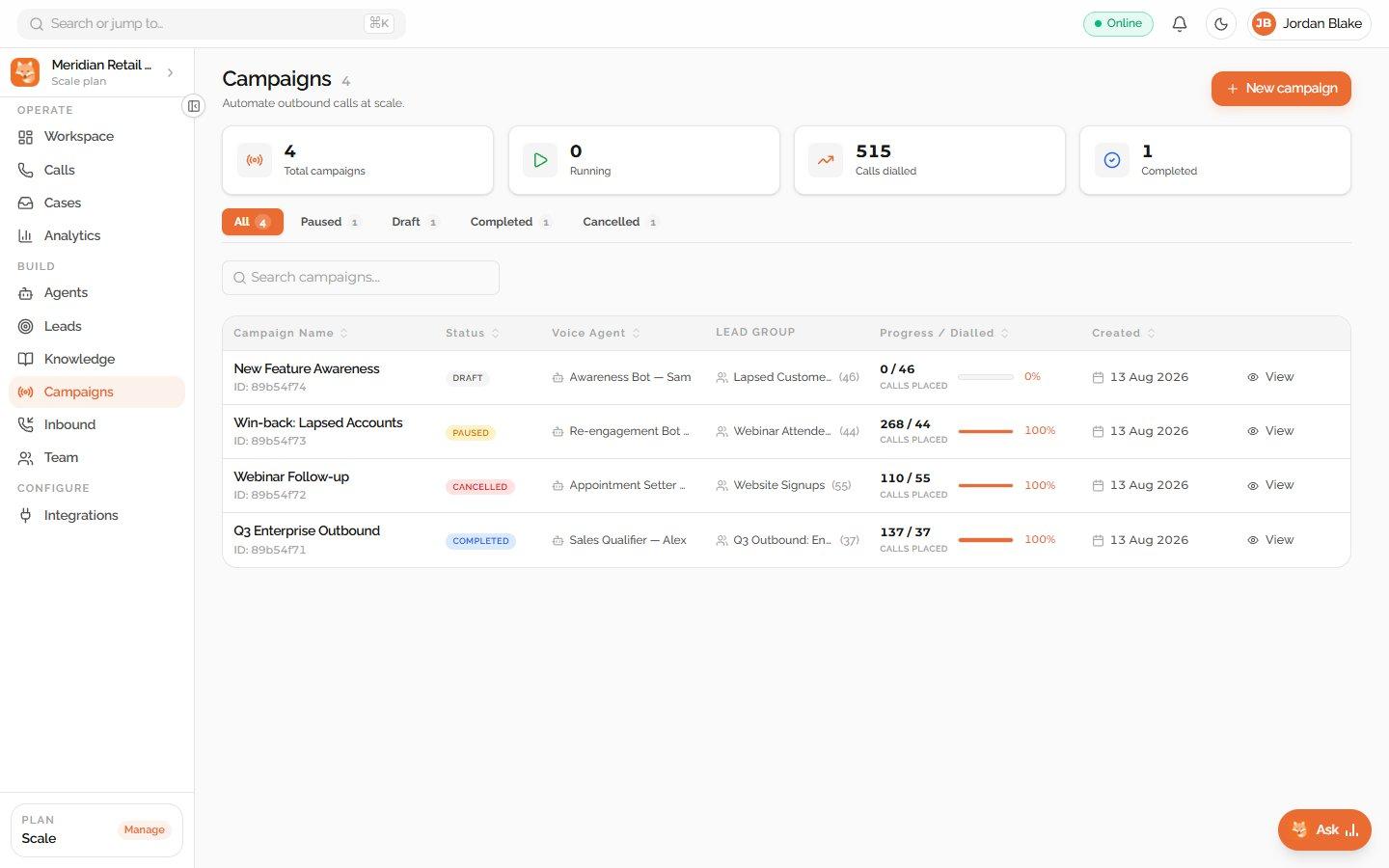
What happens after you hit send
The part most tools do not show you, whether the campaign actually worked.
- 1
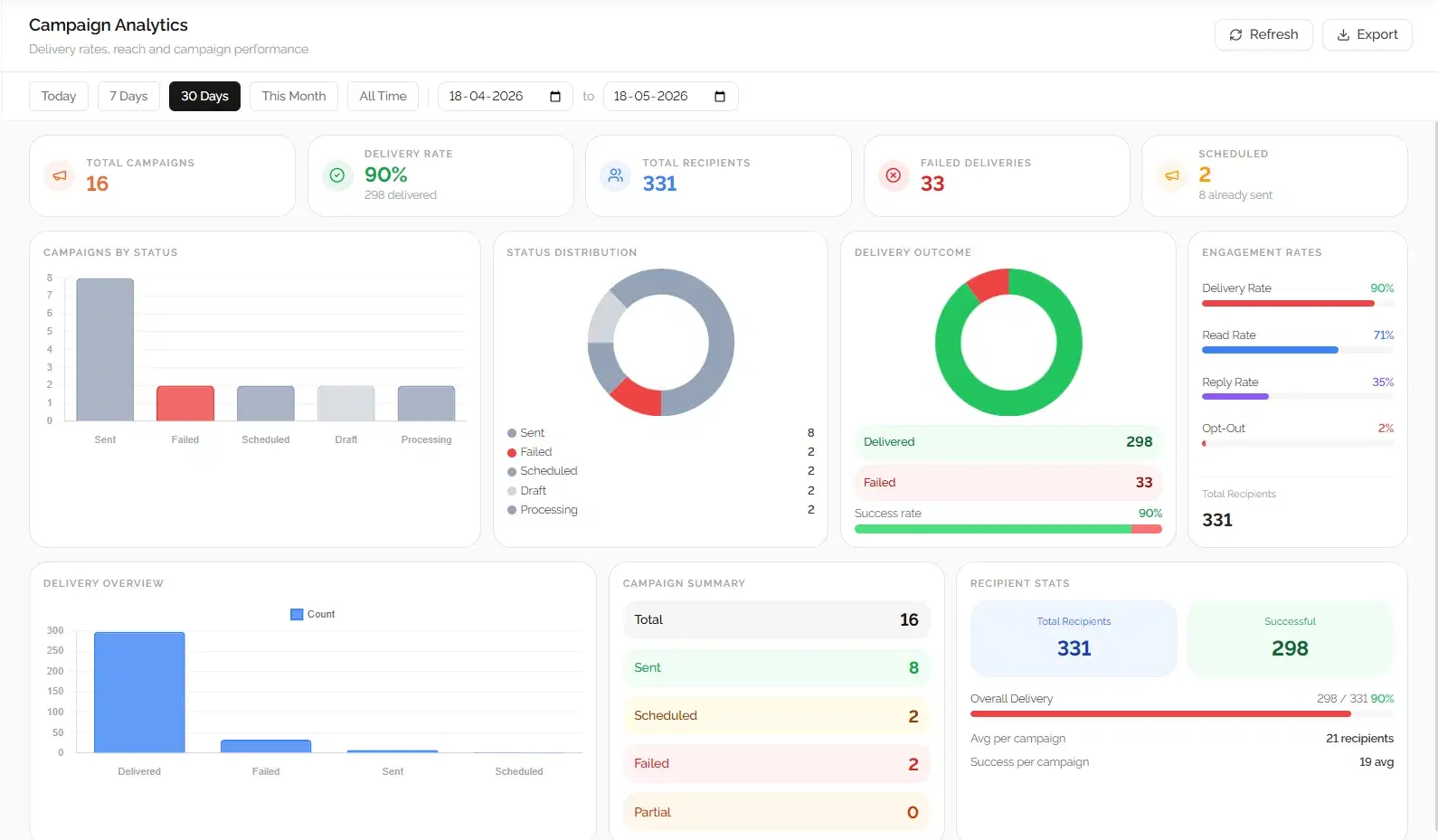
Delivery, read and reply rates in one view
See exactly how many messages were delivered, opened and replied to, broken down by segment, not just a single blended number.
- 2
Replies become scored leads automatically
Anyone who responds with real interest gets an intent score and lands in the pipeline, so the campaign feeds sales directly rather than ending at "sent".
- 3
See which template actually performs
Compare read and reply rates across templates you have sent before, so the next campaign starts from what already worked, not a guess.
5
channels, one contact record
50+
languages for replies
24/7
cover after a campaign lands
0 to 100
intent score on every reply
Campaigns that suit what you sell
A restaurant and a retailer send very different messages. These pages show the same campaign tools set up per sector.
Frequently asked questions about Dunefox
What types of WhatsApp campaigns can I run with Dunefox?
Dunefox supports WhatsApp broadcast campaigns using pre-approved Meta message templates. Campaign types include product launch announcements, seasonal promotions, service update notifications, re-engagement sequences for inactive customers, and outbound prospecting to qualified leads. All campaigns are sent via the official WhatsApp Business API.
Can I schedule WhatsApp campaigns in advance with Dunefox?
Yes. Dunefox allows campaigns to be scheduled for a specific date and time. Campaigns move through clear statuses (Scheduled, Processing, Sent, Partial, or Failed) so you always know exactly what is happening. A full campaign history with performance stats is maintained for every campaign ever sent.
How does Dunefox track WhatsApp campaign delivery?
Dunefox tracks delivery at both campaign and per-recipient level. Campaign-level metrics show total sent, delivered, failed, and still processing, all updated in real time. Per-recipient delivery logs show the exact status for each individual contact. Delivery rate is shown as a percentage so you can benchmark performance across campaigns.
Can I segment my audience before sending a WhatsApp campaign?
Yes. Dunefox allows audience selection before every campaign, letting you target a specific customer segment or your full contact list. Segments can be built by lead status, channel source, custom tags, product interest, or date of last interaction. This ensures campaigns are relevant and avoids messaging uninterested contacts.
Are Dunefox WhatsApp campaigns compliant with Meta's policies?
Yes. All Dunefox broadcast campaigns use pre-approved WhatsApp message templates and are sent exclusively via the official WhatsApp Business API. Dunefox does not support unofficial bulk messaging tools. Template approval is required from Meta before a campaign can be sent, which ensures compliance and protects sender reputation.
What is the WhatsApp message open rate compared to email?
WhatsApp messages have a 98% open rate compared to approximately 20% for email. For businesses managing customer relationships over WhatsApp, this makes broadcast campaigns significantly more effective than email marketing for time-sensitive promotions, appointment reminders, and re-engagement sequences.
How do WhatsApp broadcast campaigns work end-to-end in Dunefox?
You start by creating a message template in Dunefox with text, media, and CTA buttons. The template is submitted to Meta for approval, which typically takes a few minutes to a few hours. Once approved, you select your audience segment, schedule a send time, and launch. Dunefox sends the campaign via the official WhatsApp Business API and tracks delivery, read, and reply metrics in real time. When a customer replies to the broadcast, the conversation lands in your shared inbox so your team or AI agent can respond.
What is the difference between WhatsApp broadcasts and email marketing?
Email marketing relies on inbox placement and competes with spam filters, newsletters, and promotions tabs. Average open rates sit around 20 percent. WhatsApp broadcasts land directly in the customer's primary chat list with a 98 percent open rate and average reply rates of 15 to 25 percent. WhatsApp messages feel like personal conversations rather than marketing blasts, which drives significantly higher engagement. However, WhatsApp requires pre-approved templates, which ensures messages are relevant and non-spammy.
How does Dunefox handle WhatsApp message template approval?
When you create a new message template in Dunefox, it is submitted to Meta for review through the WhatsApp Business API. Meta checks the template against its commerce and messaging policies. Approval typically takes minutes for straightforward templates and up to 24 hours for complex ones. Dunefox shows the approval status (Pending, Approved, or Rejected) in real time. Rejected templates include Meta's rejection reason so you can revise and resubmit quickly.
Can I re-engage dormant customers with WhatsApp campaigns?
Yes. Dunefox lets you build segments based on last interaction date, purchase history, and engagement signals. You can target customers who have not interacted in 30, 60, or 90 days with a re-engagement campaign containing a personalised offer, new product announcement, or loyalty reward. Because WhatsApp messages have near-universal open rates, re-engagement campaigns on WhatsApp outperform email win-back sequences significantly.
Put your next campaign where it gets read
Start the 14 day free trial, connect WhatsApp and send your first broadcast this week. No card needed.
14 days free. All Fox Pro features. No card required.