A WhatsApp broadcast sends one message to many customers at once, and each person receives it as a private, one-to-one chat. Done well, it is one of the highest-engagement ways to reach an audience anywhere. WhatsApp messages are opened roughly 98% of the time, versus about 20% for email.
But there is a catch that trips up most businesses. The free WhatsApp Business App limits broadcasts to 256 contacts, and it only reaches people who have saved your number. Try to get around that with an unofficial bulk-sender and Meta will ban your number fast. This guide explains both methods, when to use each, the exact steps to send a broadcast, and the compliance rules that keep your number safe.
We will also cover how the WhatsApp Business API, used through a platform like Dunefox, removes the 256-contact ceiling and adds automation, buttons, and analytics.
What Is a WhatsApp Broadcast Message?
A WhatsApp broadcast is a message sent to multiple recipients at the same time, where each recipient receives it as an individual chat rather than in a shared group. Replies come back to you privately, and recipients cannot see each other, which makes broadcasts far more personal and far less spammy than a WhatsApp group blast.
This is the key difference between a broadcast and a group. In a group, everyone sees every message and every member. In a broadcast, it feels like a normal private message, which is exactly why open and reply rates stay so high.
"A WhatsApp group shouts at everyone at once. A broadcast whispers to each person individually, at scale. That single difference is why broadcasts convert and group blasts get you muted."
What Is a WhatsApp Broadcast List?
A WhatsApp broadcast list is the saved group of recipients a broadcast goes out to. It is a distribution list, not a chat: the people on it never see the list, never see each other, and never know it exists. You build it once and reuse it for every send.
On the WhatsApp Business App, a broadcast list holds a maximum of 256 contacts, and every one of them must have saved your business number for the message to arrive. You can keep several lists, but that saved-number rule applies to each of them, which is why app broadcast lists shrink in practice to a fraction of your actual audience.
On the API, the equivalent of a broadcast list is a segment: a filtered slice of your contacts built from tags, purchase history, location, or behaviour. Segments have no 256-contact cap and no saved-number requirement, and they update themselves as contacts change.
Broadcast vs Group vs Community: Which One to Use
These three get confused constantly, and picking the wrong one is what makes a campaign feel like spam.
- •Broadcast: one-to-many, delivered as private one-to-one chats. Recipients cannot see each other and replies come only to you. This is the right choice for marketing, offers, and alerts.
- •Group: many-to-many, capped at 1,024 members. Everyone sees every message and every phone number. Useful for small cohorts that genuinely need to talk to each other, such as a class batch or a project team.
- •Community: a container that links related groups under one umbrella with an announcement channel. Built for organisations like schools and residential associations, not for selling.
If your goal is to reach customers with an offer or an update, use a broadcast. Groups expose every member's phone number to strangers, which is both a privacy problem and a fast route to being muted.
Business App vs Business API: Which Broadcast Method?
There are two official ways to broadcast on WhatsApp, and choosing the right one is the most important decision you'll make. Here's the direct comparison:
| Feature | Business App | Business API |
|---|---|---|
| Recipient limit | 256 per list | Unlimited (opted-in) |
| Requires saved contact | Yes, they must save your number | No |
| Automation | None | Full (drip, triggers, AI) |
| Rich media & buttons | Limited | Full (CTA/quick-reply buttons) |
| Analytics | Read receipts only | Delivery, read, click, conversion |
| Multi-agent inbox | No | Yes |
| Cost | Free | Per-message (Meta rates) |
| Best for | A tiny local shop | Scaling businesses |
The free app broadcast is fine for a neighborhood bakery messaging 50 regulars who already saved its number. But for any business trying to grow, two limits make it unworkable: the 256-contact cap and the "must save your number" requirement. The API removes both, which is why scaling businesses run broadcasts through a platform like Dunefox.
How to Send a WhatsApp Broadcast (Step by Step)
Method 1: WhatsApp Business App (free, up to 256 saved contacts)
- •Make sure recipients have saved your business number in their phone.
- •Open WhatsApp Business → tap the three-dot menu → 'New broadcast'.
- •Select up to 256 contacts and confirm.
- •Write your message (add an image, PDF, or link) and send.
- •Track delivery and read receipts inside the broadcast list.
Method 2: WhatsApp Business API via Dunefox (unlimited opted-in contacts)
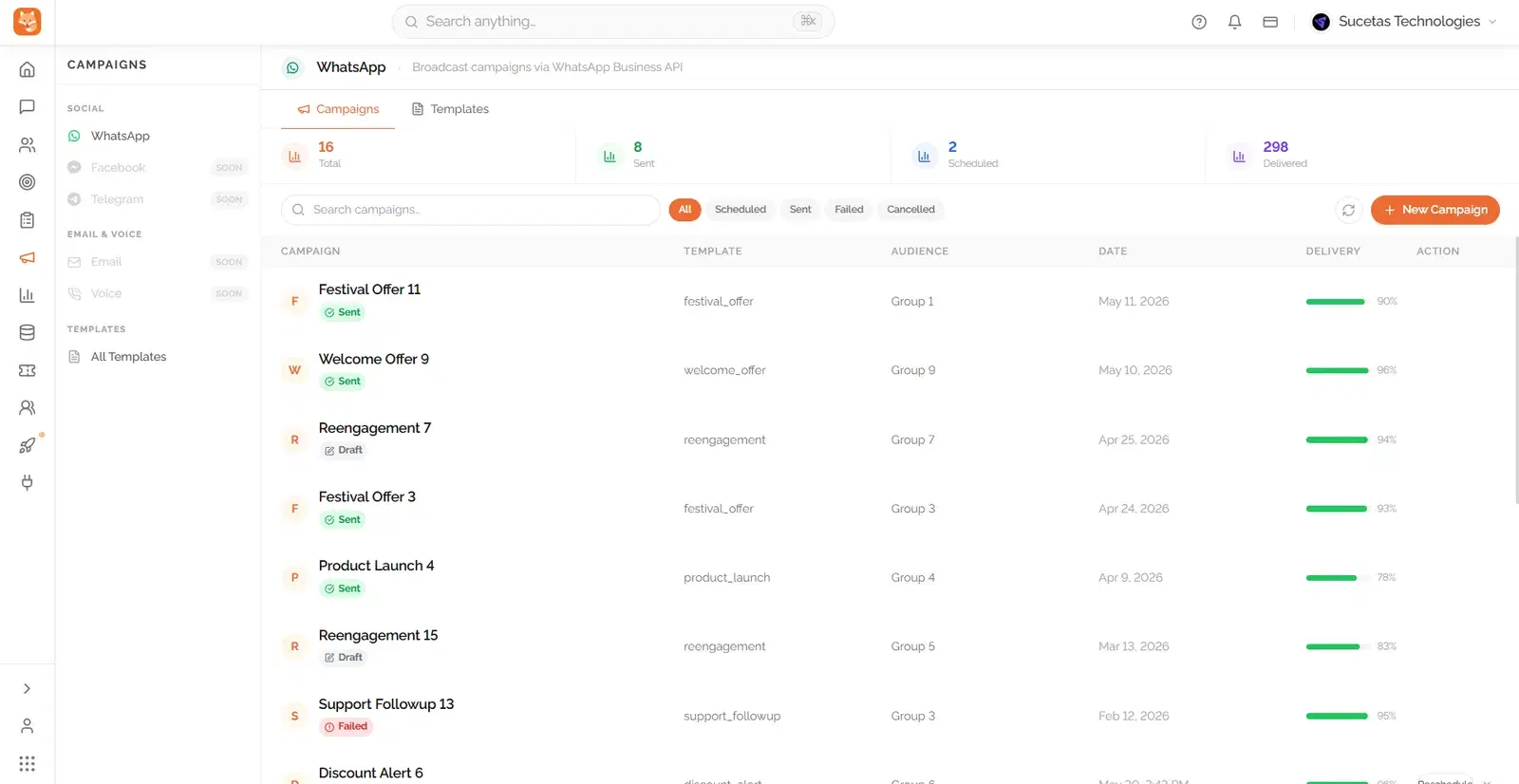
- •Connect your WhatsApp Business API number through Dunefox (setup handled for you).
- •Import your opted-in contacts or sync them from your CRM.
- •Create and submit a message template for Meta approval (required for outbound broadcasts).
- •Segment your audience by tags, behavior, or purchase history.
- •Schedule the broadcast, add CTA/quick-reply buttons, and launch.
- •Monitor delivery, read, click, and conversion rates in real time, and let AI handle the replies.
How Many Broadcasts Can You Send Before Getting Banned?
On the API, how many broadcast messages you can send per day depends on your messaging tier, which Meta raises automatically as you prove you send quality, wanted messages:
| Messaging Tier | Business-Initiated / 24h | How to Reach It |
|---|---|---|
| Unverified / Tier 1 | 250 – 1,000 / day | Default on start |
| Tier 2 | 10,000 / day | Verify business + good quality |
| Tier 3 | 100,000 / day | Sustained volume + quality |
| Tier 4 | Unlimited | High volume + high quality |
* Meta's messaging tiers for business-initiated conversations. Tiers scale automatically as you maintain a high quality rating. Source: Meta for Developers.
Your quality rating(Green, Yellow, or Red) is the number that protects these limits, or shrinks them. It is driven by how recipients react. Blocks and "report spam" taps push it down. Reads and replies keep it up. To stay in the green:
- •Only broadcast to contacts who explicitly opted in.
- •Never use unofficial bulk-sender apps. They violate Meta's terms and get numbers banned.
- •Segment and personalize so messages stay relevant.
- •Make opting out easy and honor it immediately.
- •Limit frequency to a few marketing broadcasts per week, not per day.
For a deeper dive on compliance, read our guide on how to send bulk WhatsApp messages without getting banned.
WhatsApp Broadcast Ideas That Actually Convert
A broadcast is only as good as its reason to exist. These are the broadcast types that consistently earn opens, clicks, and replies:
- •Flash sales and limited-time offers: urgency plus a single clear button.
- •New product or feature launches: lead with an image or short video.
- •Restock and price-drop alerts: sent only to interested segments.
- •Event, webinar, and appointment reminders: a large lift in show-up rates.
- •Order and delivery updates: utility broadcasts that customers welcome.
- •Festive and seasonal campaigns: Diwali, Black Friday, year-end offers.
- •Feedback and review requests: sent right after a purchase or delivery.
- •Win-back messages: re-engage dormant customers with a tailored offer.
Best Practices for High-Performing Broadcasts
Small execution details make a large difference in broadcast performance. Apply these before every send:
- •Keep it short: one message, one idea, one call to action.
- •Personalize with name, order, or location variables.
- •Add buttons. Quick-reply and call-to-action buttons lift click-through sharply.
- •Send during waking hours in the recipient's time zone (late morning and early evening tend to perform best).
- •Segment your list. A relevant offer to 2,000 people beats a generic blast to 20,000.
- •Test first. Try two versions on a small sample before the full send.
- •Always give a way to opt out and honor it instantly.
How AI Turns Broadcasts Into Conversations
A broadcast's real value is not the send. It is the replies. When thousands of people receive your message, a meaningful share respond, and that is where deals happen. Handling that reply volume by hand is impossible. AI makes it manageable.
With an AI-powered platform like Dunefox, every broadcast reply is:
- •Answered instantly, 24/7, keeping the chat inside the free 24-hour service window.
- •Qualified automatically, so only hot leads reach your sales team.
- •Routed to the right agent or department when a human is needed.
- •Handled in the customer's own language with multilingual AI.
- •Logged to your CRM so nothing falls through the cracks.
This turns a one-way broadcast into thousands of simultaneous, revenue-generating conversations without adding headcount. See how the Dunefox WhatsApp AI agent does it.
Frequently Asked Questions
Q: How many people can I send a WhatsApp broadcast to?
On the free WhatsApp Business App, broadcast lists are capped at 256 contacts, and each recipient must have saved your number. On the WhatsApp Business API, you can broadcast to unlimited opted-in contacts. The actual daily volume depends on your messaging tier, which starts at 250 to 1,000 business-initiated conversations and scales to unlimited as you maintain a high quality rating.
Q: Is a WhatsApp broadcast free?
On the WhatsApp Business App, broadcasts are free but limited to 256 saved contacts. On the API, each outbound broadcast is a template message billed at Meta's per-message rate based on category and country (for example, ~₹0.8631 per marketing message in India or ~$0.0250 in the US). Replies you send within 24 hours of a customer message are free.
Q: What's the difference between a WhatsApp broadcast and a group?
In a broadcast, each person receives the message as a private one-to-one chat and can't see other recipients; replies come to you privately. In a group, everyone sees every message and every member. Broadcasts feel personal and keep engagement high, which is why they outperform group blasts for marketing.
Q: Will I get banned for sending broadcasts?
Not if you follow the rules. Bans happen when businesses use unofficial bulk-sender apps, message people who never opted in, or send spammy, irrelevant content that gets reported. Use the official Business App or API, collect explicit opt-ins, personalize, and keep frequency reasonable to protect your quality rating.
Q: Can I schedule and automate WhatsApp broadcasts?
Yes, but only on the WhatsApp Business API. Platforms like Dunefox let you schedule broadcasts, segment audiences, add buttons, and automate replies with AI. The free Business App only supports manual, immediate sends to saved contacts with no automation.
Q: How does Dunefox help with WhatsApp broadcasts?
Dunefox connects your WhatsApp Business API, imports your opted-in contacts, handles template approval, and lets you segment, schedule, and send broadcasts to unlimited contacts. Its AI then answers every reply, qualifies leads, and routes conversations, turning a single broadcast into thousands of managed conversations.
Send Broadcasts Without Limits Using Dunefox
The 256-contact ceiling and "save my number" requirement are why businesses outgrow the free app fast. Dunefox removes both.
With Dunefox WhatsApp automation, you broadcast to unlimited opted-in contacts, add buttons and rich media, schedule campaigns, and let AI handle every reply, all from one dashboard.
Cleaner segmentation, healthier quality rating, and automated conversations mean every broadcast drives more revenue with less manual work.
WhatsApp broadcasts are one of the most effective tools in modern marketing, but only when sent the right way. Stay on official channels, earn genuine opt-ins, keep messages relevant, and let automation handle the replies. Do that, and a single broadcast can outperform an entire month of email.
Want to broadcast beyond 256 contacts and automate the follow-up? Explore Dunefox pricing or book a demo to go live in 48 hours.