

Businesses today are moving fast. Customers expect instant answers, employees need quick access to information, and teams cannot afford to waste time searching through files, documents, and old emails. This is one reason why more companies are investing in AI business automation. Instead of asking team members to manually answer the same questions every day, businesses are now training AI to understand their internal knowledge. The best part is that you no longer need developers or technical teams to make this happen. With modern no-code tools, even non-technical businesses can build powerful AI assistants. In this guide, you will learn how to train an AI knowledge base using your own business data, without writing a single line of code.
What Does It Mean to Train an AI on Your Business Knowledge Base?
When people hear the phrase “train AI,” many imagine complex programming or data science work. But in business, training AI usually means something much simpler. It means giving AI access to your company’s information so it can understand your products, services, policies, and processes. Once trained, the AI can answer questions, assist employees, support customers, and even help your sales team.
A business knowledge base can include many types of information. It may include FAQs, product documents, training guides, pricing sheets, customer support articles, onboarding manuals, or internal SOPs. Many businesses already store this information in tools like Notion, Google Docs, spreadsheets, or shared folders. The problem is that this knowledge is often scattered. AI helps bring all that information together into one smart system.
Why Businesses Are Training AI on Internal Knowledge
As businesses grow, information becomes harder to manage. Teams answer the same customer questions again and again. New employees struggle to find updated procedures. Sales teams search through old documents for pricing or product information. Customer support teams sometimes give different answers because everyone is working from different sources.
This creates delays, confusion, and inconsistent customer experiences. It also slows down operations. That is why companies are adopting knowledge management automation. AI can act like a smart assistant that knows your business and gives instant answers. Instead of searching through multiple tools, your team can ask one AI assistant and get accurate information in seconds.
What Data Can You Use to Train AI?
One of the biggest myths about AI is that you need special data. The truth is that most businesses already have the information needed to build a strong AI assistant. The real challenge is organizing it.
You can train AI using business content like PDFs, SOP documents, training manuals, product catalogs, support articles, customer emails, sales scripts, pricing sheets, and internal documents. Businesses also connect knowledge from platforms like Airtable or CRM systems like HubSpot. The quality of your AI depends on the quality of your data. If your content is clear, updated, and organized, your AI will perform much better.
That is why train AI on business data is not just about uploading files. It is about giving AI the right information.
How Does AI Actually Learn Your Business Knowledge?
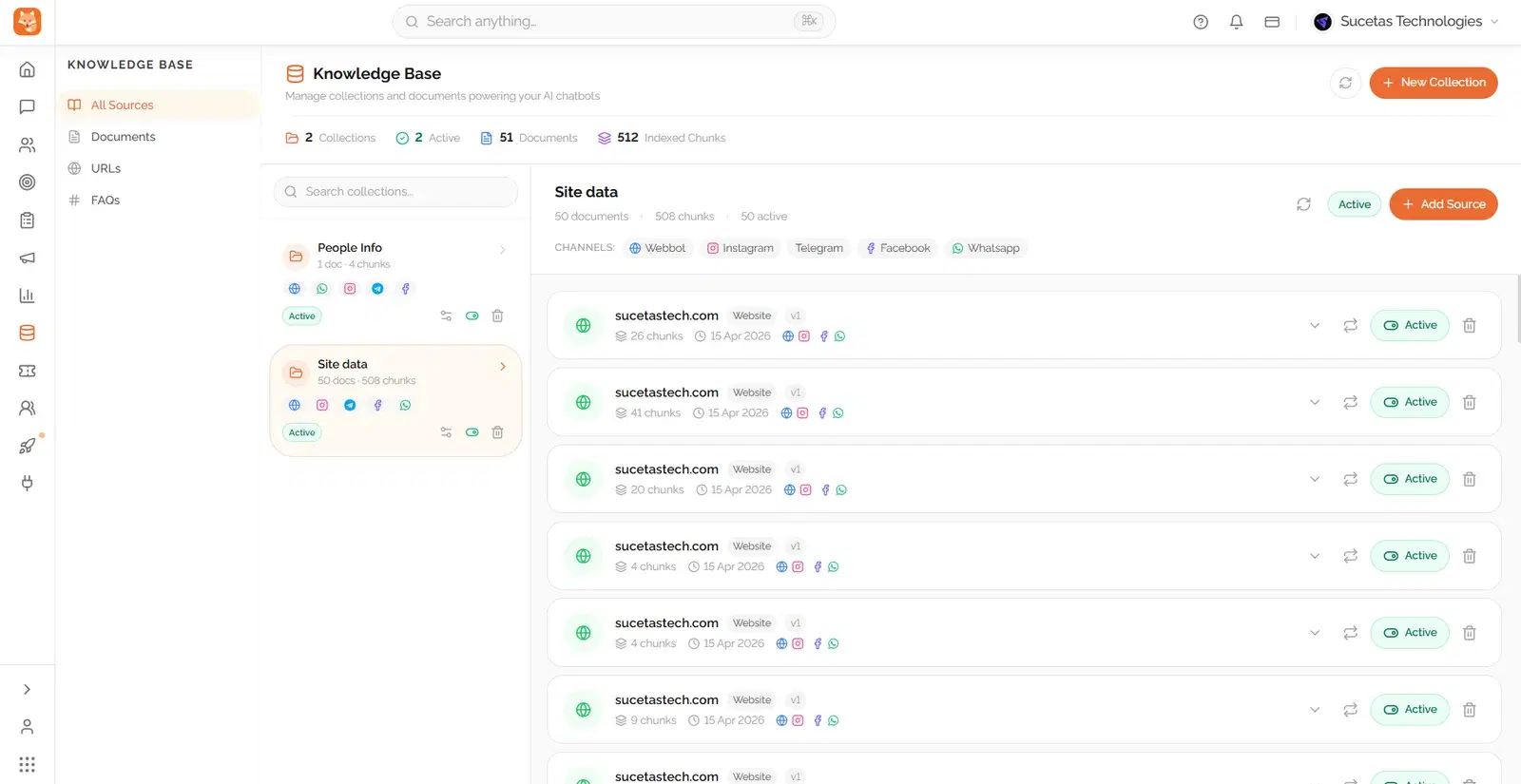
Modern AI platforms make this process much easier than most people expect. When you upload documents, the AI reads the content and breaks it into smaller pieces of useful information. It then organizes those pieces so it can quickly find the best answer when someone asks a question.
For example, if a customer asks about your refund policy, the AI searches your uploaded knowledge base and finds the most relevant answer. If an employee asks about onboarding steps, the AI can pull information from your training documents. Many platforms use AI models powered by companies like OpenAI to make this possible.
This is what makes AI knowledge training so powerful. The AI is not memorizing like a human. It is learning how to find, understand, and deliver the right information at the right time.
Can You Train AI Without Writing Code?
Yes, absolutely. This is one of the biggest reasons businesses are adopting AI today. No-code platforms have removed the technical barriers that used to stop companies from using AI.
Instead of writing code, you can simply upload documents, connect your tools, and test your AI through simple interfaces. You can connect business documents, FAQs, CRM data, and support content without hiring developers. This makes no code AI training ideal for founders, support managers, operations teams, and growing businesses.
What once required engineers can now be done in a few hours. That changes everything for companies that want to scale faster.
Step-by-Step: How to Train an AI on Your Business Knowledge Base
Training your AI does not need to be complicated. It becomes much easier when you follow a clear process.
- Step 1: Organize Your Business Knowledge. Start by collecting your important business documents. Remove outdated files, duplicate information, and unclear content. Clean data creates better AI performance.
- Step 2: Choose the Right AI Platform. Not all AI platforms are built for business use. Look for features like document uploads, CRM integrations, security controls, analytics, and messaging support.
- Step 3: Upload Your Knowledge. Add your PDFs, FAQs, SOPs, support articles, pricing guides, and product documents. This gives your AI the foundation it needs.
- Step 4: Test Real Questions. Ask the AI the same questions your customers or employees ask every day. Test pricing questions, onboarding questions, support questions, and product-related queries.
- Step 5: Keep Improving. AI gets better when you keep updating it. Add new documents, improve weak responses, and keep your knowledge base current.
This process helps you build a custom AI assistant that becomes smarter over time.
Common Mistakes Businesses Make
Many companies expect AI to work perfectly on day one. That usually leads to disappointment. AI needs quality data and real testing before it performs at its best.
One common mistake is uploading outdated or messy documents. Another is expecting AI to understand unclear information. Some businesses also forget to test real customer scenarios. Others ignore human handoff, which is still important when conversations become complex.
Avoiding these mistakes can dramatically improve your business AI implementation. The goal is not to replace humans completely. The goal is to make teams faster and more effective.
Real Business Use Cases
A trained AI can help almost every part of a business. Customer support teams can use AI to answer FAQs instantly. Sales teams can use it to share pricing, product details, and objection handling. HR teams can use AI to help new employees during onboarding.
Operations teams can use AI to find SOPs and internal processes quickly. Internal teams can ask the AI for company policies instead of searching through folders. Businesses can even connect AI to platforms like WhatsApp for customer conversations.
This is where AI for business operations creates real value. It saves time, improves consistency, and reduces operational stress.
How to Choose the Right AI Knowledge Platform
Choosing the right platform matters. A simple chatbot builder may not be enough if you want true business automation. You need a platform that understands documents, supports workflows, and connects with your existing systems.
Look for features like:
- Document Upload Support: Upload PDFs, FAQs, SOPs, and internal guides.
- Multi-Language Support: Serve global customers easily.
- Analytics & Insights: Track what users ask most often.
- Human Handoff: Transfer complex questions to your team when needed.
These features make AI knowledge base software much more valuable in real business environments.
Conclusion: Why Businesses Are Choosing Dunefox
Training AI on your business knowledge is no longer something only big tech companies can do. Today, any business can build a smart AI assistant without writing code. The real challenge is choosing the right platform that does more than basic automation.
This is where Dunefox stands out. Instead of offering just another chatbot, Dunefox helps businesses build powerful AI business automation systems trained on their real business knowledge. You can upload your SOPs, FAQs, training manuals, product documents, and customer support content, and Dunefox turns that information into an intelligent assistant that works across your business.
What makes Dunefox different is that it goes beyond document search. It combines knowledge automation, customer support, sales workflows, CRM integrations, and messaging channels like WhatsApp into one platform. This means your AI does not just answer questions. It helps your business sell faster, support better, and operate smarter.
Ready to automate your operations with a custom AI knowledge base?
Book a free discovery call